AI Group Twerk Generator
Curious about generating twerk videos from group photos? Here is everything you need to know about how AI handles multiple people in a single image.
Generate Your Twerk Video NowSee It In Action
Input Photo
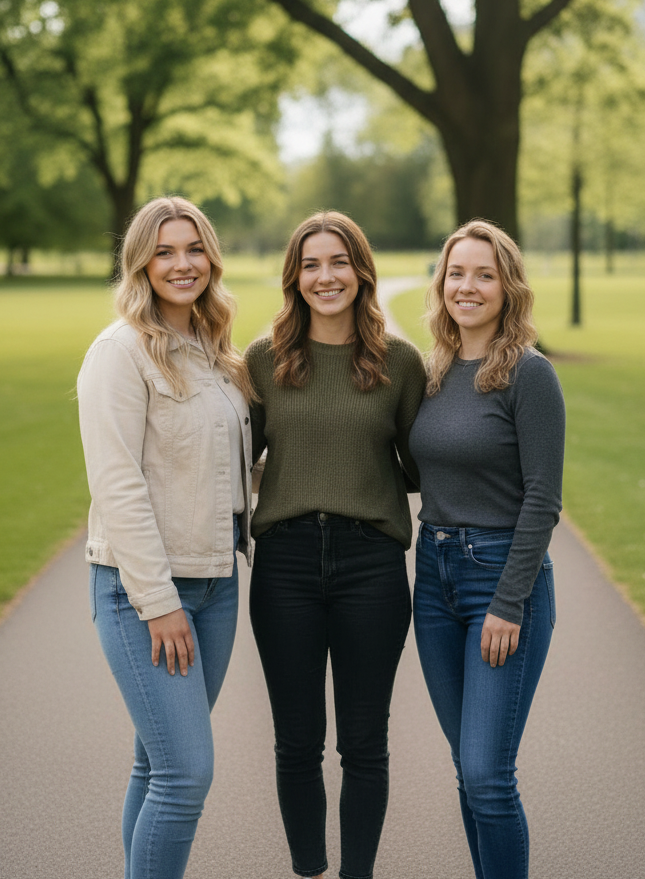
AI Twerk Output
Can AI Generate Twerk Videos from Group Photos?
Group twerk videos are one of the most requested features in AI video generation. The idea is simple: upload a photo with multiple people and get a video where everyone is twerking together. The reality of making this work well, however, involves some significant technical challenges.
Current AI video generation technology works best when it can focus on a single subject in the frame. When multiple people are present, the AI needs to track each person independently, generate separate motion paths that do not overlap or collide, and maintain visual consistency for every individual throughout the video. This is a much harder problem than animating a single person.
That said, our tool can process photos with multiple people in them. The AI will attempt to animate the most prominent subject in the frame, and depending on the composition, it may also add movement to other figures. The results vary based on how the group is arranged, how much space is between individuals, and how clearly each person is visible.
For the most reliable and highest quality results, we recommend using individual photos. But if you want to experiment with group shots, this guide will help you get the best possible outcome.
How AI Handles Multiple Subjects
When the AI receives a group photo, it goes through a detection phase where it identifies each person in the image. It maps body positions, estimates depth and overlap between figures, and determines which subject is the primary focus based on size, centering, and visibility.
The primary subject typically receives the most attention in terms of animation quality. The AI applies the selected twerk style to this person first, generating smooth and detailed motion. Secondary subjects in the frame may receive lighter animation or may remain relatively static, depending on how the AI interprets the scene.
One of the main challenges with group animation is collision detection. When two people are standing close together, the AI needs to make sure that animated movement does not cause one person's body to clip through or overlap with another. This is computationally expensive and sometimes results in the AI reducing the range of motion for closely grouped subjects.
Another challenge is maintaining identity consistency. With a single subject, the AI has a clear reference for what that person looks like from every angle. With multiple people, there is a risk of features blending between subjects, especially if they have similar body types, skin tones, or clothing. The AI works to keep each person distinct, but results are best when the individuals in the photo look noticeably different from each other.
Best Practices for Group Photo Input
If you want to try generating a twerk video from a group photo, following these guidelines will significantly improve your results.
Keep the group small. Two to three people is the sweet spot. The AI handles duos and trios much better than large groups of four or more. As the number of subjects increases, the quality of individual animations decreases because the AI has to divide its attention and processing power.
Space between subjects matters. Photos where people are standing with clear gaps between them produce better results than photos where people are pressed shoulder to shoulder. The AI needs visible separation to track each body independently and generate clean motion for each person.
Make sure everyone is fully visible. Partially hidden subjects, such as someone standing mostly behind another person, will not animate well. The AI needs to see enough of each person's body to generate convincing movement. If one person is largely obscured, consider cropping them out and focusing on the visible subjects.
Similar heights and poses help. When everyone in the photo is standing in a similar position and at a similar scale, the AI can more easily apply consistent animation across the group. Dramatic differences in pose or distance from the camera can confuse the motion generation.
Good lighting across all subjects is important. If one person is well lit and another is in shadow, the AI may struggle with the darker subject. Even, consistent lighting across the entire group produces the cleanest results.
Use a clean, uncluttered background. With multiple subjects already adding complexity to the scene, a busy background makes the AI's job even harder. Simple, solid, or mildly textured backgrounds give the AI the best chance of producing clean animations for every person in the frame.
Current Limitations with Group Twerk Videos
Transparency is important, so here are the honest limitations of group twerk generation with current AI technology.
The primary subject will always look better than secondary subjects. The AI prioritizes the central or most visible person, and that individual will receive the smoothest, most detailed animation. Others in the frame may have less natural movement or reduced range of motion.
Synchronized choreography is not yet reliable. Getting multiple AI-animated figures to twerk in perfect sync, like a coordinated dance team, is extremely difficult. The AI generates motion independently for each subject, so exact synchronization is not guaranteed.
Close physical contact between subjects can cause visual artifacts. If people in the photo are touching, holding hands, or have overlapping limbs, the AI may produce glitches or distortions in those areas during animation.
Processing time increases with the number of subjects. A single-person twerk video typically processes in two to five minutes. Group photos may take longer because the AI has more bodies to track and animate.
The overall video quality may be slightly lower than single-subject videos because the AI is distributing its processing capacity across multiple people. Each individual animation may not be quite as refined as what you would get from a solo photo.
These limitations are improving as AI models become more capable, and we update our system regularly to incorporate the latest advances. But for now, setting realistic expectations about group results will help you get the most from the tool.
The Best Approach: Individual Photos Combined
For users who absolutely need a group twerk video with the highest possible quality, we recommend an alternative approach. Instead of uploading a single group photo, generate individual twerk videos from separate photos of each person.
This gives the AI full focus on each subject, producing the best possible animation quality for every person. You can then use basic video editing software to combine the individual videos into a side-by-side or split-screen format that creates the appearance of a group twerk.
Free video editors like CapCut, InShot, or even the built-in editors on TikTok and Instagram make it easy to place multiple videos next to each other. You can sync them to the same music track to create the illusion of choreographed group twerking.
This approach gives you complete control over the final product. You can adjust the timing so everyone appears to start at the same moment, choose complementary twerk styles for variety, and ensure each person looks their absolute best.
The trade-off is that it takes more time and effort than uploading a single group photo. But if quality is your priority, this method produces significantly better results than trying to animate everyone from a single image.
Getting Started with Group or Individual Photos
Whether you decide to try a group photo or go the individual route, the process starts the same way. Visit the homepage and upload your photo. Select a twerk style from the seven presets or write a custom description. Choose your video length and hit generate.
If you are uploading a group photo, we recommend starting with the Basic Twerk preset. It produces the most consistent results across multiple subjects because the motion is simpler and less likely to cause issues with overlapping figures. Once you see how the AI handles your specific group photo, you can experiment with more dynamic styles.
For individual photos that you plan to combine later, feel free to use any style you like. Club Energy and Circular Roll are popular choices for group content because they have enough visual energy to be exciting when shown side by side.
Each video generation costs one credit for 10 seconds or two credits for 15 seconds. For the individual combination approach, you will need one credit per person. For a group photo, you only need one credit for the entire image.
All generated videos are saved to your dashboard, so you can come back and download them anytime. There is no rush to combine or edit them right away.
Ready to Create Your Twerk Video?
Upload a photo and get a realistic AI twerk video in minutes.
Try It Now